-
Amazon Kinesis Streams - easy secure stream video
-
Amazon Rekognition Video - detect objects, faces, text
-
Amazon DataSync - send huge amount of data from on-prem to AWS S3 cloud
- AWS DataSync is primarily used to migrate existing data to Amazon S3. On the other hand, AWS Storage Gateway is more suitable if you still want to retain access to the migrated data and for ongoing updates from your on-premises file-based applications.
- enables you to migrate your on-premises data to Amazon S3, Amazon EFS, and Amazon FSx for Windows File Server. You can configure DataSync to make an initial copy of your entire dataset and schedule subsequent incremental transfers of changing data toward Amazon S3.
-
Amazon Data Lifecycle Manager - automates creation, retention and deletion of EBS Snapshots
-
AWS Outposts - fully managed services that brings AWS infrastructure, services, APIs and tools directly to customer locations. Its tailored for workloads that must remain at on-premises.
-
Amazon CloudFront - CDN service using global network of edge locations to cache contents closer to end users.
- Delivers:
- Data
- Videos
- Applications
- APIs
- CloudFront is integrated with AWS – both physical locations that are directly connected to the AWS global infrastructure, as well as other AWS services. CloudFront works seamlessly with services, including AWS Shield for DDoS mitigation, Amazon S3, Elastic Load Balancing or Amazon EC2 as origins for your applications, and Lambda@Edge to run custom code closer to customers’ users and to customize the user experience. Lastly, if you use AWS origins such as Amazon S3, Amazon EC2 or Elastic Load Balancing, you don’t pay for any data transferred between these services and CloudFront.
- Delivers:
-
Global Accelerator - enhance applications availability and performance
- AWS Global Accelerator and Amazon CloudFront are separate services that use the AWS global network and its edge locations around the world. CloudFront improves performance for both cacheable content (such as images and videos) and dynamic content (such as API acceleration and dynamic site delivery). Global Accelerator improves performance for a wide range of applications over TCP or UDP by proxying packets at the edge to applications running in one or more AWS Regions. Global Accelerator is a good fit for non-HTTP use cases, such as gaming (UDP), IoT (MQTT), or Voice over IP, as well as for HTTP use cases that specifically require static IP addresses or deterministic, fast regional failover. Both services integrate with AWS Shield for DDoS protection.
- Provides you with static anycast IP addresses that serve as a fixed entry point to your applications hosted in one or more AWS Regions
-
AWS DMS - migrates data stores between on-prem and cloud. Performs one time migrations, and offers configurations to set up cdc sync to keep sources and targets in sync
-
AWS SCT - Schema Conversion Tool - eases up the conversion of source databases to a format compatible with target database when migrating
-
AWS MGN - Application Migration Service - lift-and-shift migrations of applications from physical infrastructure, VMware vSphere, Microsoft Hyper-V, Amazon Elastic Compute Cloud, Amazon Virtual Private Cloud and other clouds to AWS
-
AWS SNS - Take note that you should use SNS instead of SES (Simple Email Service) when you want to monitor your EC2 instances.
- By default, an Amazon SNS topic subscriber receives every message published to the topic. You can use Amazon SNS message filtering to assign a filter policy to the topic subscription, and the subscriber will only receive a message that they are interested in.
-
AWS WAF - web application firewall that helps protect your web applications from common web exploits. This service is more about providing security to your applications.
- lets you monitor the HTTP and HTTPS requests that are forwarded to
- an Amazon API Gateway API
- Amazon CloudFront
- an Application Load Balance
- lets you choose one of the following behaviors:
- Allow all requests except the ones that you specify – This is useful when you want CloudFront or an Application Load Balancer to serve content for a public website, but you also want to block requests from attackers.
- Block all requests except the ones that you specify – This is useful when you want to serve content for a restricted website whose users are readily identifiable by properties in web requests, such as the IP addresses that they use to browse to the website.
- Count the requests that match the properties that you specify – When you want to allow or block requests based on new properties in web requests, you first can configure AWS WAF to count the requests that match those properties without allowing or blocking those requests. When you’re confident that you specified the correct properties, you can change the behavior to allow or block requests.
- To detect and mitigate DDoS attacks, you can use AWS WAF in addition to AWS Shield.
- You can deploy AWS WAF on Amazon CloudFront as part of your CDN solution, the Application Load Balancer that fronts your web servers or origin servers running on EC2, or Amazon API Gateway for your APIs.
- by using AWS WAF’s rate-based rules, you can automatically block the IP addresses of bad actors when requests matching a rule exceed a threshold that you define. Requests from offending client IP addresses will receive 403 Forbidden error responses and will remain blocked until request rates drop below the threshold. This is useful for mitigating HTTP flood attacks that are disguised as regular web traffic. It is recommended that you add web ACLs with rate-based rules as part of your AWS Shield Advanced protection. These rules can alert you to sudden spikes in traffic that might indicate a potential DDoS event. A rate-based rule counts the requests that arrive from any individual address in any five-minute period. If the number of requests exceeds the limit that you define, the rule can trigger an action such as sending you a notification.
- lets you monitor the HTTP and HTTPS requests that are forwarded to
-
AWS EFA - Elastic Fiber Adapter - Enables you to run applications requiring high levels of inter-node communications at scale on AWS through its custom-built operating system (OS) bypass hardware interface
-
Amazon Cognito - used for single sign-on in mobile and web applications. You don’t have to use it if you already have an existing Directory Service to be used for authentication.
- not designed to integrate with corporate directory services for centralized authentication directly. It only provides identity solutions for applications and websites, especially with external users, social logins, and federated identities.
- not for providing access to your AWS resources
-
AWS Glue - retrieves data from sources and writes data to targets stored and transported in various data formats. supports using the Parquet format
- When a crawler runs, it takes the following actions to interrogate a data store:
- Classifies data to determine the format, schema, and associated properties of the raw data
- Groups data into tables or partitions
- Writes metadata to the Data Catalog
- The AWS Glue DynamoDB export connector is designed primarily for analytics workloads, enabling exports of DynamoDB data to Amazon S3.
- When a crawler runs, it takes the following actions to interrogate a data store:
-
Amazon EMR (Elastic MapReduce) Serverless - a cost-effective managed cluster platform that simplifies running big data frameworks. Using EMRFS in detecting new data files from an Amazon S3 bucket is not a suitable choice.
- EMRFS is simply an implementation of HDFS (Hadoop Distributed File System) that all Amazon EMR clusters use for reading and writing regular files from Amazon EMR directly to Amazon S3.
-
AWS Batch - intended for managing batch processing tasks in Docker containers.
-
Secrets Manager - enables you to replace hardcoded credentials in your code (including passwords), with an API call to Secrets Manager to retrieve the secret programmatically.
- Also, you can configure Secrets Manager to automatically rotate the secret for you according to the schedule that you specify. This enables you to replace long-term secrets with short-term ones, which helps to significantly reduce the risk of compromise.
-
AWS ACM - a managed private CA service that helps you easily and securely manage the lifecycle of your private certificates to allow SSL communication to your application.
-
AWS KMS - makes it easy for you to create and manage encryption keys and control the use of encryption across a wide range of AWS services.
-
AWS Organization - a service that allows you to manage multiple AWS accounts easily. With this service, you can effectively consolidate billing and manage your resources across multiple accounts.
- In addition to this, you can also configure a service control policy (SCP) to manage your AWS accounts. SCPs help you enforce policies across your organization and control the services and features accessible to your other account. This way, you can ensure that your organization’s resources are used only as intended and prevent unauthorized access.
-
AWS IAM Identity Center - can be integrated with your corporate directory service for centralized authentication. This means you can sign in to multiple AWS accounts with just one set of credentials.
-
AWS Directory Service - to manage user directories such as Microsoft Active Directory, and it’s not intended to be used directly for multi-account authentication purposes.
-
Decoupled architecture - a type of computing architecture that enables computing components or layers to execute independently while still interfacing with each other. Amazon Simple Queue Service (SQS) and Amazon Simple Workflow Service (SWF) are the services that you can use for creating a decoupled architecture in AWS.
-
Amazon SQS - offers reliable, highly-scalable hosted queues for storing messages while they travel between applications or microservices. Amazon SQS lets you move data between distributed application components and helps you decouple these components. is a fully managed message queuing service that enables you to decouple and scale microservices, distributed systems, and serverless applications. SQS eliminates the complexity and overhead associated with managing and operating message-oriented middleware and empowers developers to focus on differentiating work. Using SQS, you can send, store, and receive messages between software components at any volume without losing messages or requiring other services to be available.
- The ReceiveMessageWaitTimeSeconds is the queue attribute that determines whether you are using Short or Long polling. By default, its value is zero which means it is using Short polling. If it is set to a value greater than zero, then it is Long polling.
Hence, configuring Amazon SQS to use long polling by setting the ReceiveMessageWaitTimeSeconds to a number greater than zero is the correct answer.
Quick facts about SQS Long Polling:
– Long polling helps reduce your cost of using Amazon SQS by reducing the number of empty responses when there are no messages available to return in reply to a ReceiveMessage request sent to an Amazon SQS queue and eliminating false empty responses when messages are available in the queue but aren’t included in the response.
– Long polling reduces the number of empty responses by allowing Amazon SQS to wait until a message is available in the queue before sending a response. Unless the connection times out, the response to the ReceiveMessage request contains at least one of the available messages, up to the maximum number of messages specified in the ReceiveMessage action.
– Long polling eliminates false empty responses by querying all (rather than a limited number) of the servers. Long polling returns messages as soon any message becomes available.
- Amazon SWF - Simple Workflow Service - a web service that makes it easy to coordinate work across distributed application components.
- Amazon CloudWatch - a monitoring service for AWS cloud resources and the applications you run on AWS. You can use Amazon CloudWatch to collect and track metrics, collect and monitor log files, and set alarms. Amazon CloudWatch can monitor AWS resources such as Amazon EC2 instances, Amazon DynamoDB tables, and Amazon RDS DB instances, as well as custom metrics generated by your applications and services and any log files your applications generate. You can use Amazon CloudWatch to gain system-wide visibility into resource utilization, application performance, and operational health. To monitor custom metrics, you must install the CloudWatch agent on the EC2 instance.
- AWS Budgets - allows you to be alerted and run custom actions if your budget thresholds are exceeded.
- Cost and Usage Report (CUR) - breakdown of costs incurred by each department based on tags
- Amazon AppStream 2.0 - a fully managed application streaming service.
- Amazon Data Firehose - a fully managed service for delivering real-time streaming data. it can stream data to an S3 bucket, it is not suitable to be used as a queue for a batch application.
- ECS - The
EnableTaskIAMRoleoption is only applicable for Windows-based ECS Tasks that require extra configuration. - Amazon MQ - primarily used as a managed message broker service and not a queue.
- AWS License Manager - is a service that makes it easier for you to manage your software licenses from software vendors (for example, Microsoft, SAP, Oracle, and IBM) centrally across AWS and your on-premises environments. This provides control and visibility into the usage of your licenses, enabling you to limit licensing overages and reduce the risk of non-compliance and misreporting.
- Amazon Redshift Spectrum - extends the querying capabilities of Amazon Redshift to also access and analyze structured and semi-structured data in S3, supporting large-scale analytics.
- Amazon Textract -
- Amazon Polly -
- Amazon Lex - enables you to build applications using a speech or text interface powered by the same technology that powers Amazon Alexa. Amazon Lex provides deep functionality and flexibility in natural language understanding (NLU) and automatic speech recognition (ASR), so you can build highly engaging user experiences with lifelike conversational interactions and create new categories of products.
- Amazon Comprehend Medical -
- Systems Manager Parameter Store -
- Systems Manager Service -
- AWS Amplify
- AWS Well-Architected Tool - to automatically monitor the status of your workloads across your AWS account, conduct architectural reviews and check for AWS best practices.
- AWS Resource Access Manager (RAM) -
- Amazon Workspaces -
- Amazon Pinpoint - an event is an action that occurs when a user interacts with one of your applications, when you send a message from a campaign or journey, or when you send a transactional SMS or email message. For example, if you send an email message, several events occur:
– When you send the message, a send event occurs.
– When the message reaches the recipient’s inbox, a delivered event occurs.
– When the recipient opens the message, an open event occurs.
- AWS Elastic Disaster Recovery (AWS DRS) - provides continuous block-level replication, recovery orchestration, and automated server conversion capabilities. These allow customers to achieve a crash-consistent recovery point objective (RPO) of seconds, and a recovery time objective (RTO) typically ranging between 5–20 minutes.
- AWS Data Transfer Terminal - is a secure, network-ready physical location where organizations can bring their own storage devices and upload data to AWS through a high-throughput connection.
S3
- Glacier - only for archives
- Vault Lock policy can help you enforce regulatory and compliance requirements. Amazon S3 Glacier provides a set of API operations for you to manage the Vault Lock policies.
- As an example of a Vault Lock policy, suppose that you are required to retain archives for one year before you can delete them. To implement this requirement, you can create a Vault Lock policy that denies users permission to delete an archive until the archive has existed for one year. You can test this policy before locking it down. After you lock the policy, the policy becomes immutable. For more information about the locking process, see Amazon S3 Glacier Vault Lock. If you want to manage other user permissions that can be changed, you can use the vault access policy.
- EBS snapshots sent to S3
- Snowball - consider when data transfer with existing network takes more than 1 week
- Transfer Acceleration - improves upload performance by utilizing edge locations, doesn’t work well with large datasets on limited bandwidth connection
- hosting website on S3 prerequisites:
- S3 bucket name should be same as domain name
- Registered domain name
- DMS - can use S3 as target in an AWS DMS task, for both full load and cdc data is written in comma separated value (.csv) format by default, can also store in .parquet (Apache Parquet) format
- S3 Object lock can be in
- Compliance mode: no one can update/delete the S3 object; not even root user or AWS
- Governance mode: allows certain users to change (root user of AWS account)
- You have three mutually exclusive options depending on how you choose to manage the encryption keys:
- Use Server-Side Encryption with Amazon S3-Managed Keys (SSE-S3)
- Use Server-Side Encryption with AWS KMS Keys (SSE-KMS)
- Use Server-Side Encryption with Customer-Provided Keys (SSE-C) Amazon S3 encrypts your data at the object level as it writes it to disks in its data centers and decrypts it for you when you access it.
Virtual Interface (VIF)
- A VIF is a logical interface on a Direct Connect connection that determines what AWS resources you can reach over that connection.
- There are three types of VIFs:
- Private VIF
- Public VIF
- Transit VIF
AMI
- AMIs are categorized as either
- backed by Amazon EBS: root device for an instance launched from the AMI is an EBS volume created from EBS snapshot.
- backed by instance store: root device for an instance launched from the AMI is an instance store volume created from a template stored in S3.
EC2
- Always remember that you should associate IAM roles with EC2 instances and not an IAM user, for the purpose of accessing other AWS services
- Take note that you should use SNS instead of SES (Simple Email Service) when you want to monitor your EC2 instances.
- In Auto Scaling, the following statements are correct regarding the cooldown period:
- It ensures that the Auto Scaling group does not launch or terminate additional EC2 instances before the previous scaling activity takes effect.
- Its default value is 300 seconds.
- It is a configurable setting for your Auto Scaling group.
EBS
- replication - in the zone created (not in any other zone)
- attachment - can be attached to EC2 in same AZ
- snapshots - sent to S3
- There are 3 types of EBS volumes
- General Purpose (SSD)
- Provisioned IOPS (SSD)
- Magnetic (HDD)
Network
- Placement Group - provides low latency network performance necessary for tightly-coupled node-to-node communication
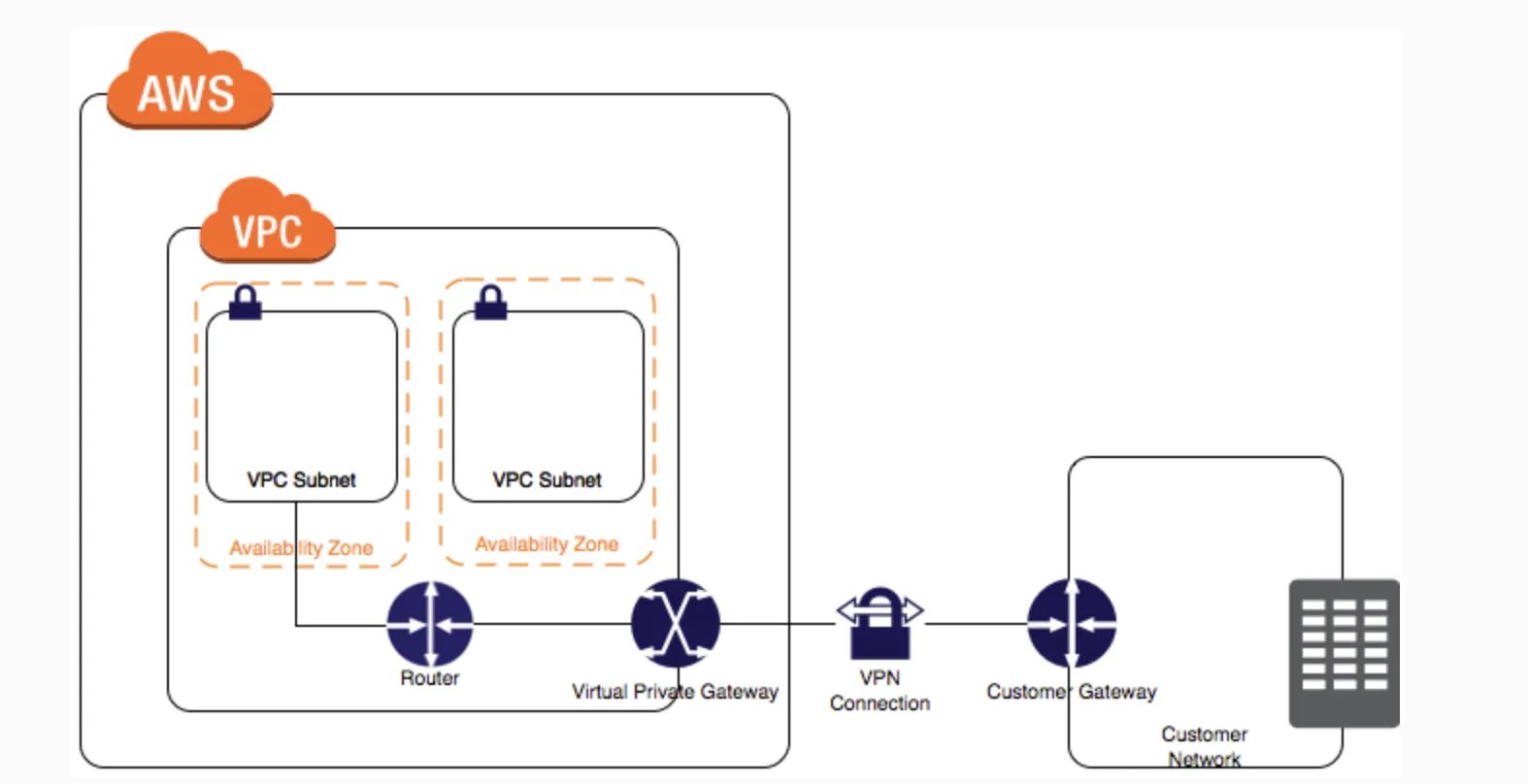
- No NAT required for VPN connection.
- VPN connection configuration of Customer Gateway with Virtual Private Gateway
-
Snowball - consider when data transfer with existing network takes more than 1 week
-
Snowball edge - is a type of Snowball device with on-board storage and compute power for select AWS capabilities. Snowball Edge can undertake local processing and edge-computing workloads in addition to transferring data between your local environment and the AWS Cloud. Each Snowball Edge device can transport data at speeds faster than the internet. This transport is done by shipping the data in the appliances through a regional carrier. The appliances are rugged shipping containers, complete with E Ink shipping labels. The AWS Snowball Edge device differs from the standard Snowball because it can bring the power of the AWS Cloud to your on-premises location, with local storage and compute functionality.
-
for EC2 in 2 different subnets need following:
- ACLs allowing communication between 2 subnets
- security groups configured properly
-
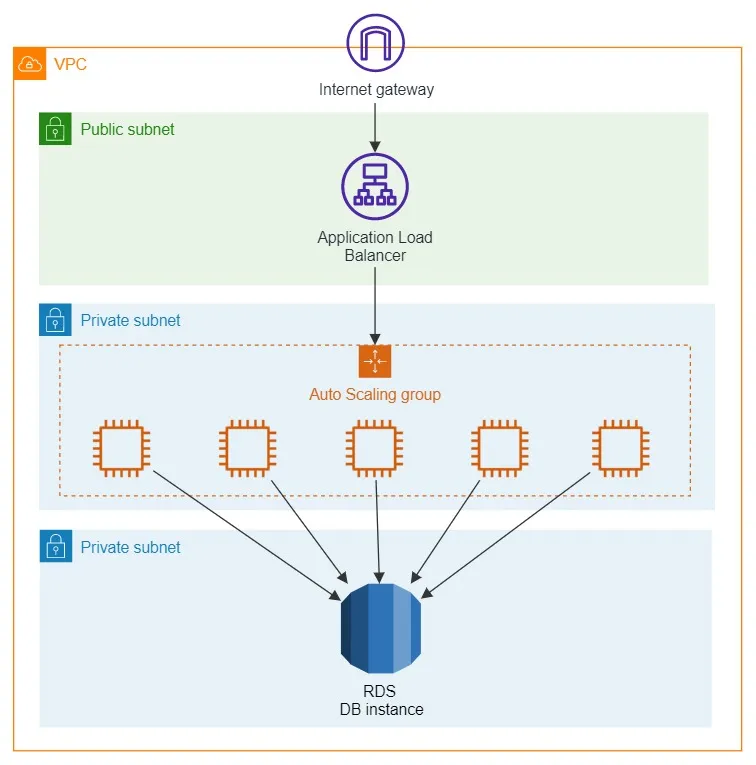
A defense-in-depth strategy is one of the design principles for security in the AWS cloud. This strategy entails implementing security controls at multiple layers
-
Components such as EC2 instances, RDS database clusters, and Lambda functions that share reachability requirements can be segmented into layers formed by subnets. For example, an RDS database cluster in a VPC with no need for internet access should be placed in subnets with no route to or from the internet. This layered approach for the controls mitigates the impact of a single layer misconfiguration, which could allow unintended access.
-
AWS Network Firewall is a stateful, managed network firewall and intrusion detection and prevention service for your virtual private cloud (VPC) that you created in Amazon Virtual Private Cloud (Amazon VPC). With Network Firewall, you can filter traffic at the perimeter of your VPC. This includes filtering traffic going to and coming from an internet gateway, NAT gateway, or over VPN or AWS Direct Connect. Network Firewall uses the open source intrusion prevention system (IPS), Suricata, for stateful inspection. Network Firewall supports Suricata compatible rules.
-
AWS Network Firewall supports domain name stateful network traffic inspection.
-
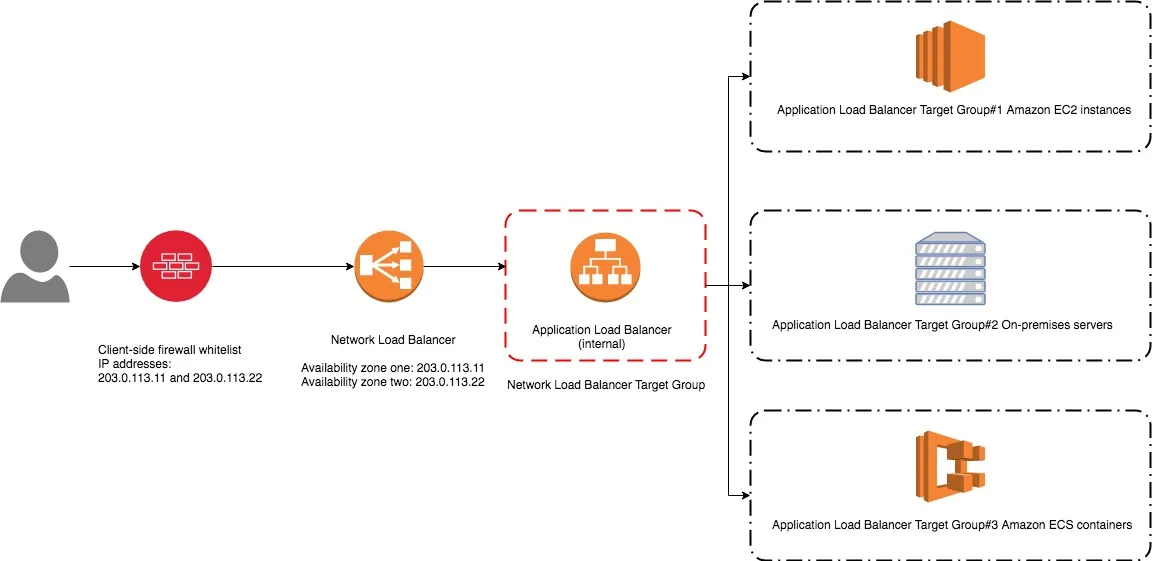
Bring Your Own IP (BYOIP) feature - to use trusted IPs as Elastic IP addresses (EIP) to a Network Load Balancer (NLB)
-
ALBs can also route and load balance gRPC traffic between microservices or between gRPC-enabled clients and services.
-
A Gateway Load Balancer operates as a Layer 3 Gateway and a Layer 4 Load Balancing service.
-
A bastion host is a special purpose computer on a network specifically designed and configured to withstand attacks. If you have a bastion host in AWS, it is basically just an EC2 instance. It should be in a public subnet with either a public or Elastic IP address with sufficient RDP or SSH access defined in the security group. Users log on to the bastion host via SSH or RDP and then use that session to manage other hosts in the private subnets.
-
Network Interface - If one of your instances serving a particular function fails, its network interface can be attached to a replacement or hot standby instance pre-configured for the same role in order to rapidly recover the service. For example, you can use a network interface as your primary or secondary network interface to a critical service such as a database instance or a NAT instance. If the instance fails, you (or more likely, the code running on your behalf) can attach the network interface to a hot standby instance.
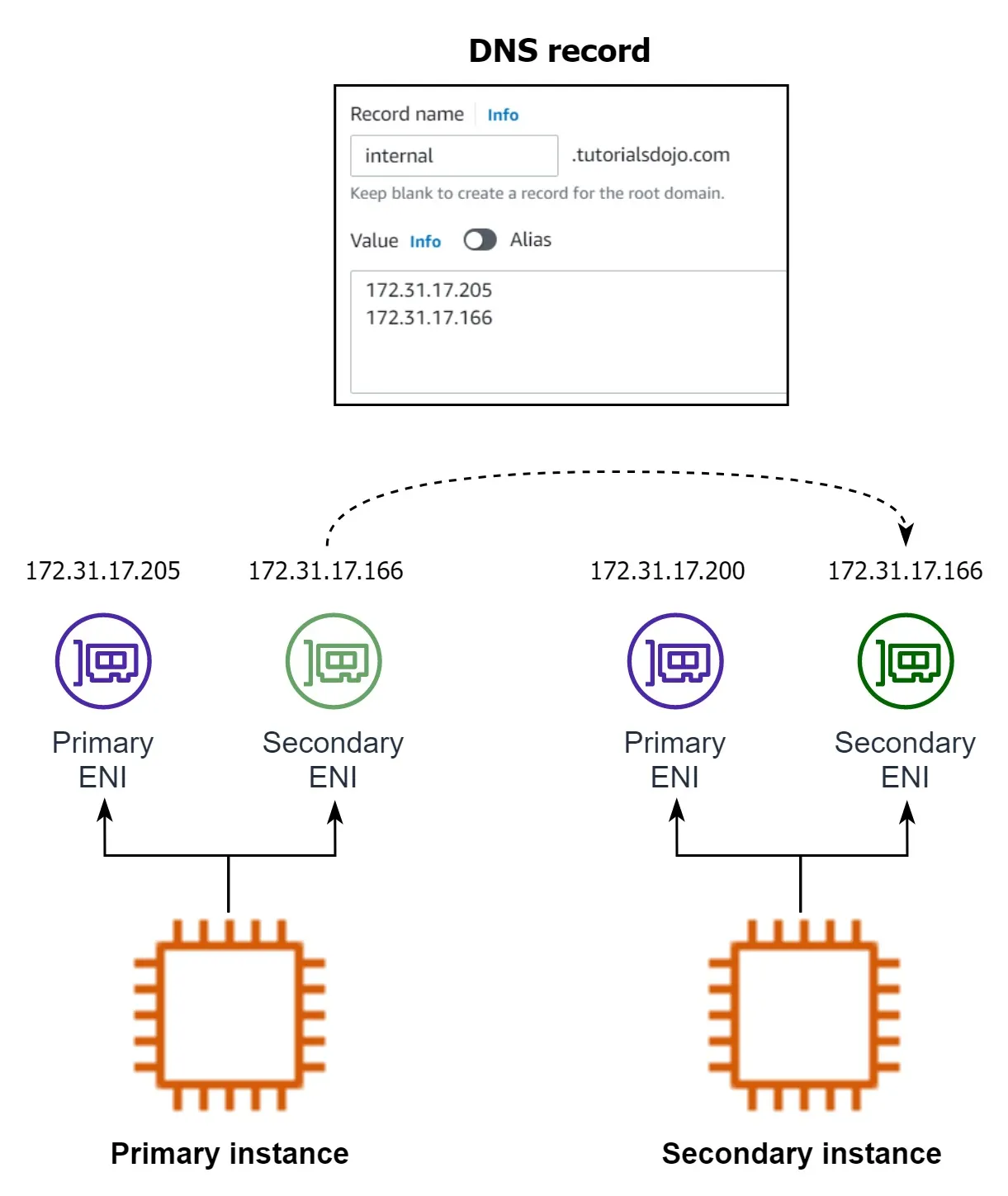 Because the interface maintains its private IP addresses, Elastic IP addresses, and MAC address, network traffic begins flowing to the standby instance as soon as you attach the network interface to the replacement instance. Users experience a brief loss of connectivity between the time the instance fails and the time that the network interface is attached to the standby instance, but no changes to the route table or your DNS server are required.
 -
In order for you to establish an SSH connection from your home computer to your EC2 instance, you need to do the following:
– On the Security Group, add an Inbound Rule to allow SSH traffic to your EC2 instance.
– On the NACL, add both an Inbound and Outbound Rule to allow SSH traffic to your EC2 instance.
The reason why you have to add both Inbound and Outbound SSH rule is due to the fact that Network ACLs are stateless which means that responses to allow inbound traffic are subject to the rules for outbound traffic (and vice versa). In other words, if you only enabled an Inbound rule in NACL, the traffic can only go in but the SSH response will not go out since there is no Outbound rule.
Security groups are stateful which means that if an incoming request is granted, then the outgoing traffic will be automatically granted as well, regardless of the outbound rules.
Route 53
- a highly available and scalable Domain Name System (DNS) web service
- perform three main functions in any combination
- domain registration
- DNS routing
- health checking
- After you create a hosted zone for your domain, such as example.com, you create records to tell the Domain Name System (DNS) how you want traffic to be routed for that domain. Each record includes the name of a domain or a subdomain, a record type, and other information applicable to the record type.
- Route 53 has different routing policies that you can choose from. Below are some of the policies:
- Latency Routing - lets Amazon Route 53 serve user requests from the AWS Region that provides the lowest latency.
- Geoproximity Routing - lets Amazon Route 53 route traffic to your resources based on the geographic location of your users and your resources. You can also optionally choose to route more traffic or less to a given resource by specifying a value, known as a bias. A bias expands or shrinks the size of the geographic region from which traffic is routed to a resource.
- Geolocation Routing - lets you choose the resources that serve your traffic based on the geographic location of your users, meaning the location that DNS queries originate from.
- Weighted Routing - lets you associate multiple resources with a single domain name (tutorialsdojo.com) or subdomain name (subdomain.tutorialsdojo.com) and choose how much traffic is routed to each resource.
- “MX” record specifies the mail server responsible for accepting emails on behalf of domain name.
- You can configure a health check that monitors an endpoint that you specify either by IP address or by domain name. At regular intervals that you specify, Route 53 submits automated requests over the Internet to your application, server, or other resource to verify that it’s reachable, available, and functional. Optionally, you can configure the health check to make requests similar to those that your users make, such as requesting a web page from a specific URL.
- To create an active-passive failover configuration with one primary record and one secondary record, you just create the records and specify Failover for the routing policy.
- When Route 53 checks the health of an endpoint, it sends an HTTP, HTTPS, or TCP request to the IP address and port that you specified when you created the health check. For a health check to succeed, your router and firewall rules must allow inbound traffic from the IP addresses that the Route 53 health checkers use.
- Weighted routing lets you associate multiple resources with a single domain name (tutorialsdojo.com) or subdomain name (blog.tutorialsdojo.com) and choose how much traffic is routed to each resource
AWS Control Tower
- AWS Control Tower provides three methods for creating member accounts: – Through the Account Factory console that is part of AWS Service Catalog. – Through the Enroll account feature within AWS Control Tower. – From your AWS Control Tower landing zone’s management account, using Lambda code and appropriate IAM roles.
- AWS Control Tower offers “guardrails” for ongoing governance of your AWS environment. Guardrails provide governance controls by preventing the deployment of resources that don’t conform to selected policies or detecting non-conformance of provisioned resources. AWS Control Tower automatically implements guardrails using multiple building blocks such as AWS CloudFormation to establish a baseline, AWS Organizations service control policies (SCPs) to prevent configuration changes, and AWS Config rules to continuously detect non-conformance.
- In this scenario, the requirement is to simplify the creation of AWS accounts that have governance guardrails and a defined baseline in place. To save time and resources, you can use AWS Control Tower to automate account creation. With the appropriate user group permissions, you can specify standardized baselines and network configurations for all accounts in the organization
VPC
- A Gateway endpoint is a type of VPC endpoint that provides reliable connectivity to Amazon S3 and DynamoDB without requiring an internet gateway or a NAT device for your VPC. Instances in your VPC do not require public IP addresses to communicate with resources in the service.
- You can use both IPv4 and IPv6 for most resources in your virtual private cloud, helping to ensure secure and easy access to resources and applications.
- A subnet is a range of IP addresses in your VPC. You can launch AWS resources into a specified subnet. When you create a VPC, you must specify a range of IPv4 addresses for the VPC in the form of a CIDR block. Each subnet must reside entirely within one Availability Zone and cannot span zones. You can also optionally assign an IPv6 CIDR block to your VPC, and assign IPv6 CIDR blocks to your subnets.
- You cannot disable IPv4 support for your VPC and subnets since this is the default IP addressing system for Amazon VPC and Amazon EC2.
- you have two VPCs that have peering connections with each other. Note that a VPC peering connection does not support edge-to-edge routing. This means that if either VPC in a peering relationship has one of the following connections, you cannot extend the peering relationship to that connection: – A VPN connection or an AWS Direct Connect connection to a corporate network – An Internet connection through an Internet gateway – An Internet connection in a private subnet through a NAT device – A gateway VPC endpoint to an AWS service; for example, an endpoint to Amazon S3. – (IPv6) A ClassicLink connection. You can enable IPv4 communication between a linked EC2-Classic instance and instances in a VPC on the other side of a VPC peering connection. However, IPv6 is not supported in EC2-Classic, so you cannot extend this connection for IPv6 communication.
- Cluster placement group - is a logical grouping of instances within a single Availability Zone. A cluster placement group can span peered VPCs in the same Region. Instances in the same cluster placement group enjoy a higher per-flow throughput limit for TCP/IP traffic and are placed in the same high-bisection bandwidth segment of the network.
RDS
- Opening a connection consumes resources on the database server. The maximum number of connections a database can support is largely determined by the amount of memory allocated to it. Upgrading to a database instance with higher memory is a straightforward way of solving the “Too Many Connections” error.
- RDS Proxy helps you manage a large number of connections from Lambda to an RDS database by establishing a warm connection pool to the database. Lambda functions interact with RDS Proxy instead of your database instance. It handles the connection pooling necessary for scaling many simultaneous connections created by concurrent Lambda functions. This allows your Lambda applications to reuse existing connections, rather than creating new connections for every function invocation.
- Since the scenario asks you to create a short-lived authentication token to access an Amazon RDS database, you can use an IAM database authentication when connecting to a database instance. Authentication is handled by AWSAuthenticationPlugin—an AWS-provided plugin that works seamlessly with IAM to authenticate your IAM users.
IAM database authentication provides the following benefits:
- Network traffic to and from the database is encrypted using Secure Sockets Layer (SSL).
- You can use IAM to centrally manage access to your database resources instead of managing access individually on each DB instance.
- For applications running on Amazon EC2, you can use profile credentials specific to your EC2 instance to access your database instead of a password for greater security
EKS
Amazon EKS supports two autoscaling products:
– Karpenter
– Cluster Autoscaler
IAM
AWS Security Token Service (STS) is the service that you can use to create and provide trusted users with temporary security credentials that can control access to your AWS resources. Temporary security credentials work almost identically to the long-term access key credentials that your IAM users can use.
In this diagram, IAM user Alice in the Dev account (the role-assuming account) needs to access the Prod account (the role-owning account). Here’s how it works:
-
Alice in the Dev account assumes an IAM role (WriteAccess) in the Prod account by calling AssumeRole.
-
STS returns a set of temporary security credentials.
-
Alice uses the temporary security credentials to access services and resources in the Prod account. Alice could, for example, make calls to Amazon S3 and Amazon EC2, which are granted by the WriteAccess role.
-
IAM Identity Center (AWS Single Sign-On) - Configure for the organization and integrate it with the company’s directory service using the Active Directory Connector.
- securely create or connect your workforce identities and manage their access centrally across AWS accounts and applications
Security
- AWS Config - Service that enables you to assess, audit, and evaluate the configurations of your AWS resources.
- The AWS Config dashboard shows the compliance status of your rules and resources. You can verify if your resources comply with your desired configurations and learn which specific resources are noncompliant.
- Config continuously monitors and records your AWS resource configurations and allows you to automate the evaluation of recorded configurations against desired configurations. With Config, you can review changes in configurations and relationships between AWS resources, dive into detailed resource configuration histories, and determine your overall compliance against the configurations specified in your internal guidelines. This enables you to simplify compliance auditing, security analysis, change management, and operational troubleshooting.
- By creating an AWS Config rule, you can enforce your ideal configuration in your AWS account. It also checks if the applied configuration in your resources violates any of the conditions in your rules.
- Amazon Detective - investigate and quickly identify root cause of security issues in AWS Workloads, as well as detecting suspicious activities
- AWS Audit Manager - continuously audits your AWS usage to simplify assessing risk and compliance with regulations and industry standards
- AWS Inspector - Inspector is a vulnerability assessment service. It looks inside your workloads for known security issues.
- Amazon CloudTrail - API call logging (who/when/what), not resource state.
- Amazon GuardDuty - threat detection from logs (CloudTrail, VPC Flow Logs, DNS logs). It looks for malicious activity in progress (e.g., crypto-mining on your EC2, a compromised IAM key), not vulnerabilities or misconfigurations.
- Amazon Macie - discovers and classifies sensitive data (PII, PHI, financial data) in S3.
- Amazon Artifact - a portal where you download AWS’s compliance reports (SOC, ISO, PCI attestations) to give to your auditors. It’s about AWS proving compliance to you, not the other way around.
- AWS Trusted Advisor - best-practice checks across cost, performance, security, fault tolerance, and service limits. More general than Config or Inspector; less detailed.
- Security Hub - aggregates findings from Config, Inspector, GuardDuty, Macie, and others into a single security dashboard and runs framework checks like CIS and AWS Foundational Security Best Practices.
DynamoDB
- Auto-scaling - DynamoDB Auto Scaling uses the AWS Application Auto Scaling service to dynamically adjust provisioned throughput capacity on your behalf.
- It is not recommended to run a production system with an embedded database on EC2 instances. A better option is to migrate the database to a managed AWS service such as Amazon DynamoDB, so you won’t have to manually maintain, patch, provision and scale your database yourself.
- gRPC protocol is at Layer 7 of the OSI Model
The line in your notes is pointing at a different abstraction layer, not “messages vs no messages.” Both brokers and queues move messages between apps; they differ in what they do with those messages and which patterns they support.
Queue (message queue)
A queue is mainly storage + delivery: producers put messages in; consumers take them out.
- Point-to-point: one message is usually handled by one consumer (competing consumers on the same queue).
- Simple model: send → store → receive. Little or no routing logic in the middle.
- AWS example: Amazon SQS — managed queues for decoupling microservices, workers, serverless, etc.
Think: “Hold this job until someone picks it up.”
Message broker
A message broker is middleware that routes messages between producers and consumers using richer rules.
- Multiple patterns: queues, pub/sub (topics), routing by keys/headers, fan-out, etc.
- Routing & semantics: exchanges, bindings, subscriptions — not just “append to a list and pop.”
- Protocols: often AMQP, MQTT, STOMP (enterprise / legacy apps).
- AWS example: Amazon MQ — managed RabbitMQ or ActiveMQ, i.e. classic brokers you’d run on-prem.
Think: “I decide who gets which message and how (queue vs broadcast vs route-by-key).”
Side-by-side
| Queue (e.g. SQS) | Broker (e.g. Amazon MQ) | |
|---|---|---|
| Primary job | Buffer messages between producer and consumer | Route messages with flexible delivery models |
| Typical pattern | Work queue / decoupling | Pub/sub, routing, legacy broker apps |
| Complexity | Low, fully managed, AWS-native | Higher; mirrors RabbitMQ/ActiveMQ |
| When to choose | New AWS apps, serverless, simple decoupling | Migrating existing broker-based apps |
Why your note says MQ “is not a queue”
For the SAA lens:
- SQS = “use a queue to decouple components.”
- Amazon MQ = “use a managed broker when you already need RabbitMQ/ActiveMQ behavior (routing, topics, AMQP),” not as the default substitute for SQS.
You can still use queues inside a broker (RabbitMQ has queues), but the service category is broker: routing, pub/sub, protocol compatibility — not SQS-style “drop a message in a hosted queue.”
Related AWS pattern: SNS + SQS gives you pub/sub on AWS without Amazon MQ: SNS fans out to many SQS queues; that’s still queue-based delivery, not a full AMQP broker.
If you want one line for the post: A queue stores and hands off work; a broker routes messages (including to queues or many subscribers) using richer messaging models.